Tone and Frequency
If a piano, a guitar, and a bass all play the same note, we can usually still tell which instrument is which, even at similar pitches and volumes. The difference is timbre: beyond pitch and loudness, each sound has its own character.
Looking at frequency first, a note usually contains a fundamental, harmonics at roughly integer multiples of it, and sounds such as the string being plucked or hitting a fret.
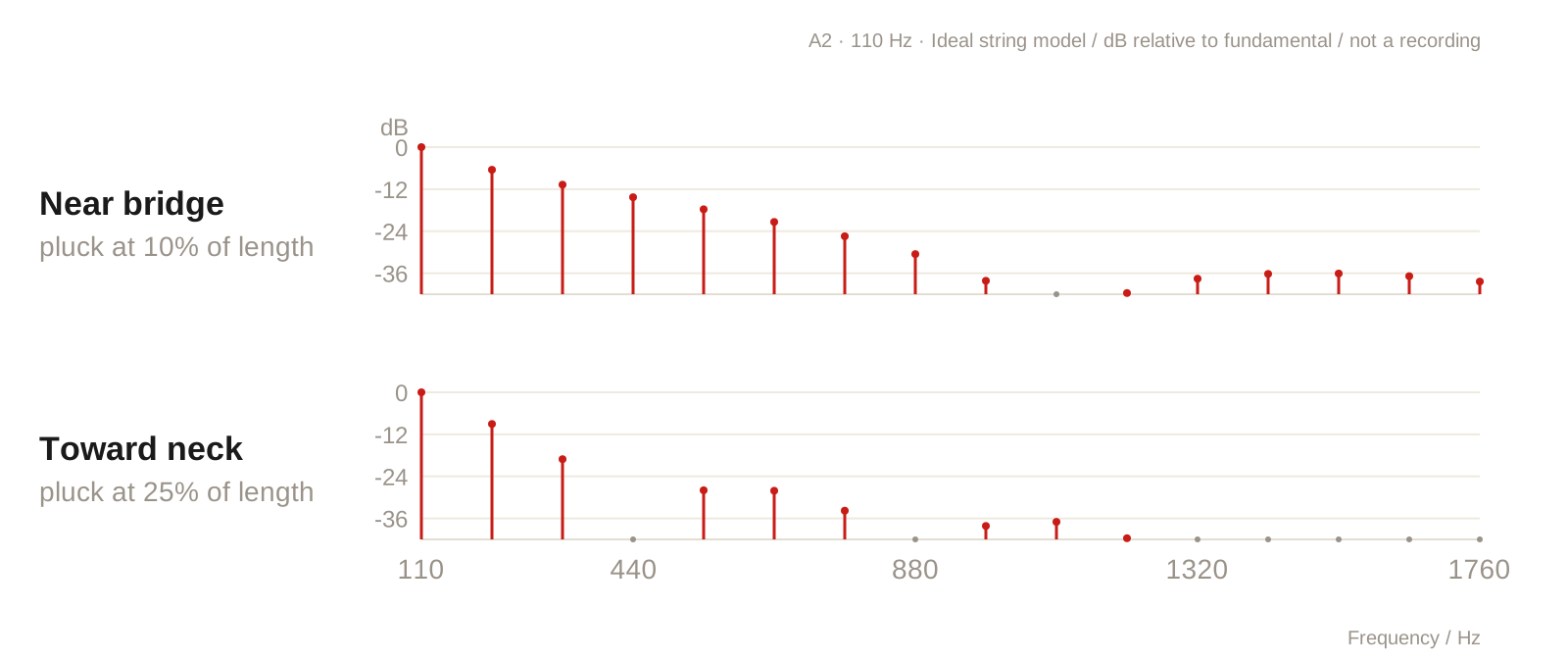
For example, when playing A2 (110 Hz), you can find a series of frequencies at 110, 220, 330, 440 Hz, and so on.
The way each instrument produces sound and resonates makes some frequencies more prominent and others weaker.
These are some of the clues that help us recognize its timbre.
On a bass, even with the same pickup settings, playing near the bridge usually brings out a greater proportion of higher harmonics. Moving toward the neck tends to sound rounder and fuller.
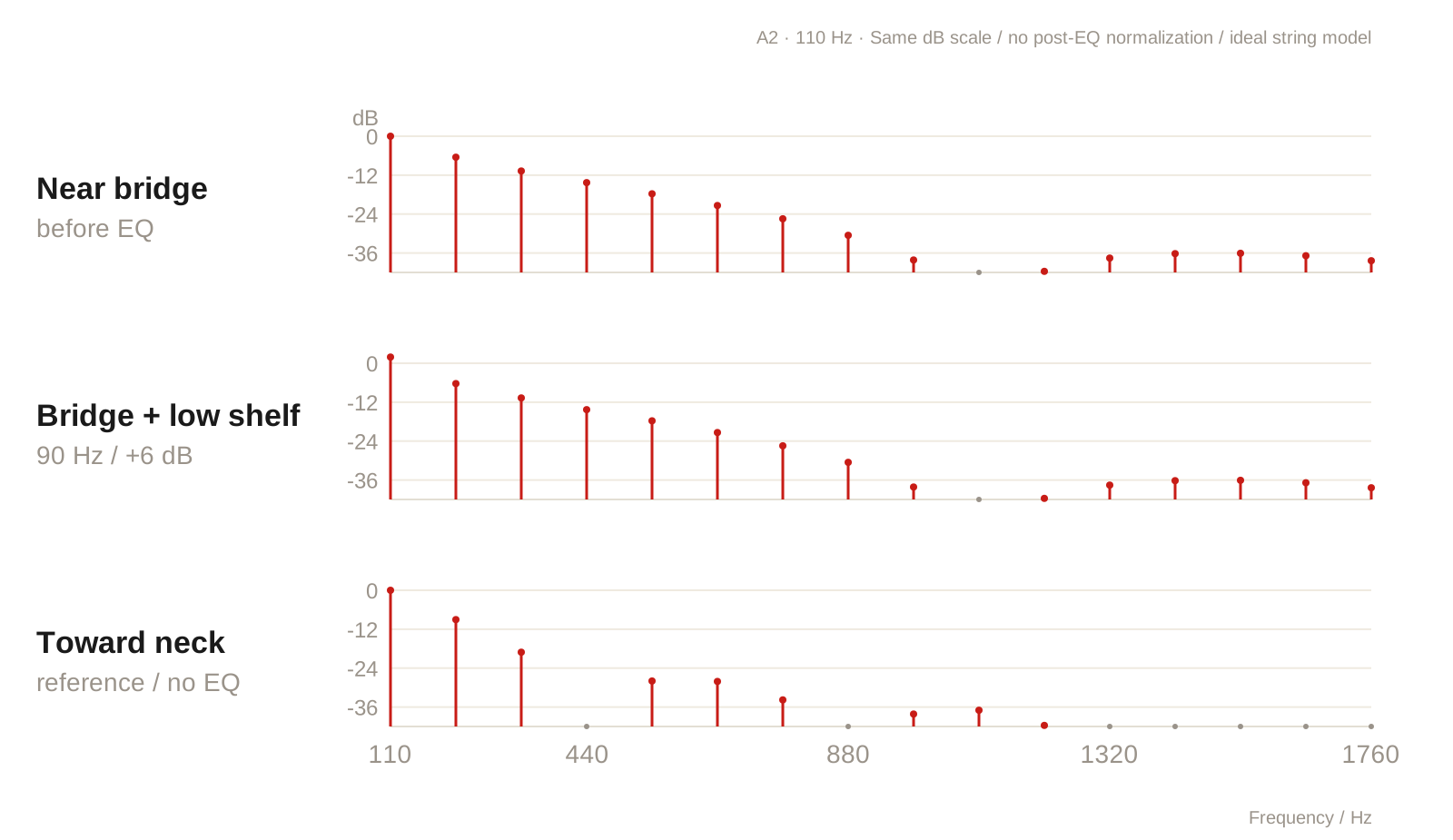
One of the most direct ways to bring back part of a sound is to increase the amplitude of the corresponding frequency range. For example, adding some low end when playing near the bridge can restore body, moving the sound toward the fullness of playing near the neck. The attack and harmonic distribution of the two playing positions are still different, though. Frequency compensation can move the sound in that direction, but it cannot fully turn one into the other.
Controlling Frequencies
Analog
A starting point for understanding frequency control in hardware is resistors and capacitors: a capacitor presents different impedances at different frequencies. Combined with a resistor, it can let some frequencies through more than others. Adding operational amplifiers and feedback circuits makes it possible to build EQ that boosts or cuts, while knobs adjust these relationships by changing resistance. There are other approaches involving inductors, too. I haven't studied analog circuits in much depth, so I'll use this as a basic way to understand the idea.
Digital
In a digital signal, each sample records the amplitude at a particular instant. Multiplying every sample by the same factor changes the overall level. To adjust only a particular frequency range, you need a filter to change the gain in that band. Defining frequency, gain, and width as precise values, so every adjustment follows consistent specifications, is one of the strengths of digital processing.
Digital frequency control, however, faithfully applies the gain you set: whatever boost you dial in is applied according to that curve. Some analog circuits gradually enter saturation as the signal gets louder, rounding off the peaks. If you're used to the sound of those preamps, large boosts with digital frequency controls can feel a little stiff or unnatural.
Another approach that's convenient to implement digitally is to adjust gain automatically with playing dynamics. For example, you can preserve the low end when playing softly, reduce it only when harder playing pushes the low-frequency energy above a threshold, then restore it as the level falls. The detection band, threshold, amount of adjustment, and response speed can all be set separately, allowing the same controls to respond differently as the input changes.
Preamps and Equalizers
Besides receiving a signal and adjusting gain, a preamp also handles the impedance relationship between the input and the next stage, helping pass the signal on to the equipment that follows. On top of that, it can include tone shaping to determine the sound's body, brightness, and contour. That's why EQ and preamp functions are often combined in both plugins and pedals, giving the player one place to adjust level and tone.
Different manufacturers also take different approaches to preamp design. The Tech 21 SansAmp Bass Driver DI, for example, emphasizes tube amplifier emulation, making saturation and distortion part of its tone. The RMI Basswitch IQ DI takes a clean approach that preserves the instrument's original sound, then uses EQ to adjust the frequency balance. So even when two devices are both called preamps, their tone and response can be quite different.
Filter Curves
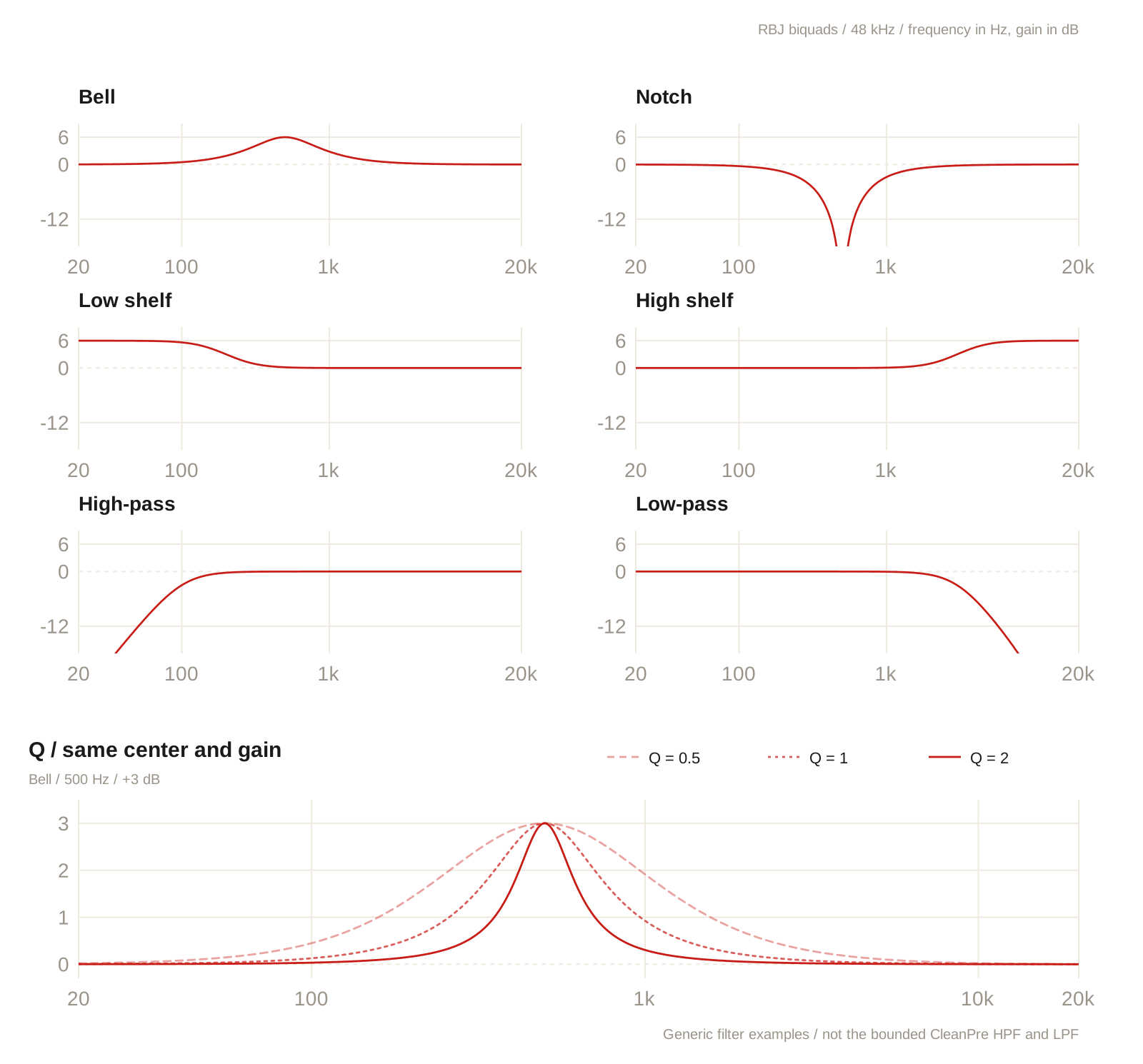
An EQ's filter type determines the basic shape of its curve. Common types include:
- Bell / Peak: centered on a frequency, with the effect gradually decreasing on either side. Useful for boosting or cutting a particular region.
- Low Shelf / High Shelf: raises or lowers the low or high end as a whole. Useful for adjusting overall body or brightness.
- High-pass / Low-pass: lets high or low frequencies through, with attenuation increasing toward the other end. Often used to tidy up the extremes of the spectrum.
- Notch: creates a deep dip around a particular frequency to target a specific resonance.
Q
For a bell EQ, Q can be understood as the width of the adjustment: a higher Q concentrates the effect, while a lower Q spreads it over a wider range. For example, with the same 3 dB boost at 500 Hz, a lower Q changes a broader area of nearby frequencies, while a higher Q focuses more closely around 500 Hz.
For overall tone shaping, I'd suggest starting with broader curves. For a resonance or hum at a fixed frequency, a narrower notch can target it more precisely. However, different EQs may define Q differently and link gain and bandwidth in different ways. Matching the numbers alone doesn't mean two tools will produce the same curve.
Coloration
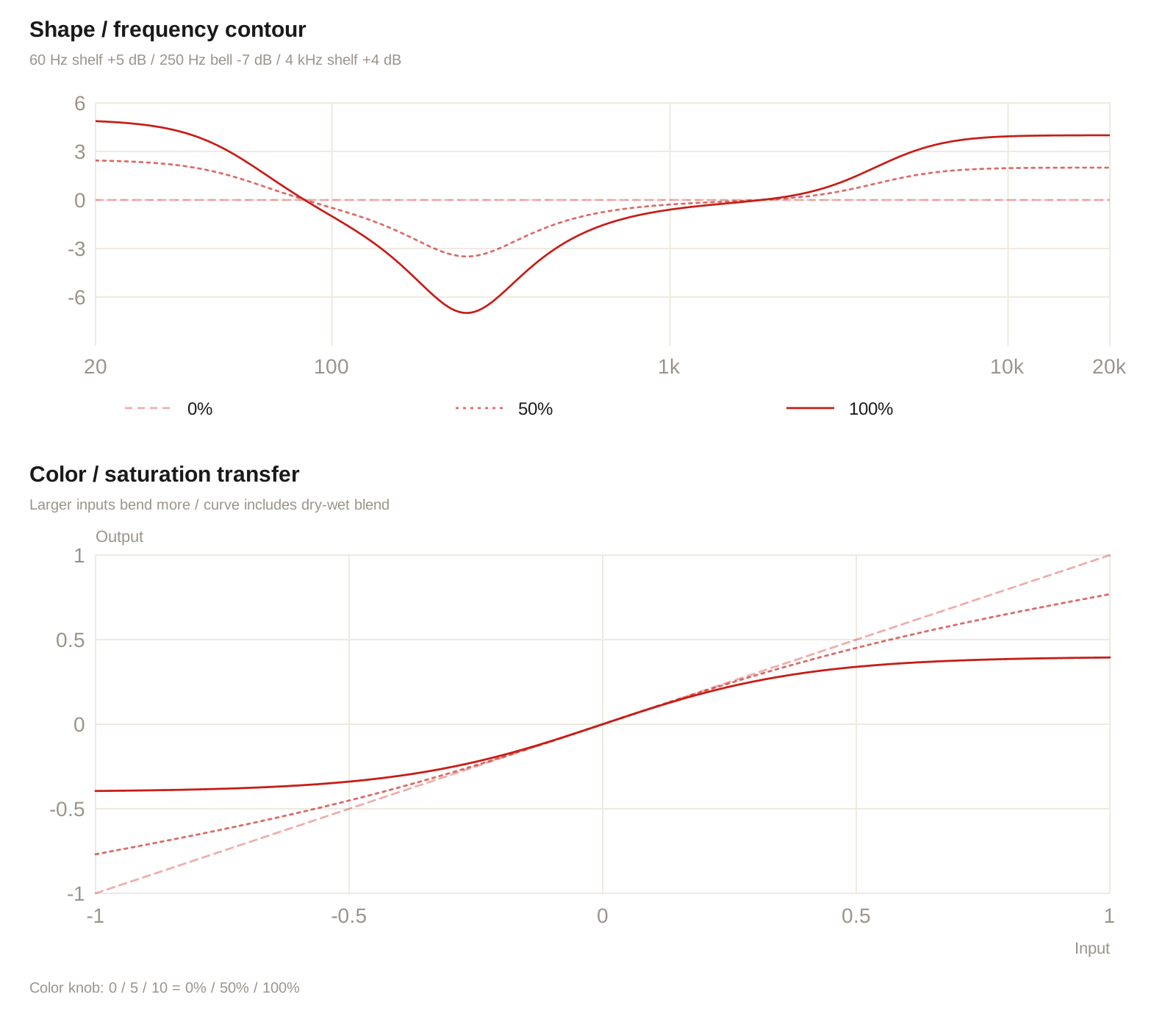
Common ways to add coloration include frequency contours and nonlinear processing. A frequency contour combines several filter curves to change the balance of multiple bands at once. Boosting the lows and highs while cutting the mids, for example, gives the sound a particular character. This is still EQ, but adjusting the whole set of curves together can create a more distinctive flavor.
Nonlinear processing makes gain vary with input amplitude. Saturation, for example, progressively reduces larger peaks, changing the waveform and generating new harmonics. So playing dynamics affect the tone as well as the original frequency balance. Boosting a frequency band beforehand also changes how strongly it drives the saturation. Both frequency contours and this amplitude-dependent response can contribute to coloration.
Building CleanPreamp
Hardware effects have to account for power supply, size, cost, and component characteristics. These constraints affect how much headroom the circuit can preserve and how it responds when overloaded. In digital processing, frequency adjustments and the coloration produced by overload can be designed separately. For this project, I tried to give each function a clear role, mainly for three reasons:
- I think controlling the frequency balance well can cover a lot of the tone adjustments we need.
- The IIR filters used here need no additional lookahead and have very low algorithmic latency. If you already have a coloration effect you like, you can place it afterward and keep the tone you're used to.
- Separating the functions makes it easier to understand what each parameter changes, and to adjust them individually when switching basses or the effects that follow.
So the focus here is on band selection, curve width, and compensation when curves overlap.
Choosing Frequency Bands
In standard tuning, the four open strings of an electric bass have fundamentals at approximately E1 (41.2 Hz), A1 (55 Hz), D2 (73.4 Hz), and G2 (98 Hz). A five-string adds a low B0 (30.9 Hz).
As you play higher up the neck, the fundamental rises too. The second harmonic of E1, for example, is around 82.4 Hz, and the third is around 123.6 Hz.
But an adjustment around 80 Hz might affect a harmonic of a low note or the fundamental of another note. The same curve affects different notes in different ways.
As a starting point, here's how I listen to a few broad ranges:
- Around 30–100 Hz: covers many of the fundamentals in the lower register, contributing to low-end weight and physical impact.
- Around 100–300 Hz: where harmonics of low notes overlap with fundamentals of higher notes. Often associated with body; too much can sound dull or muddy.
- Around 300 Hz–1 kHz: strongly related to the core of the sound and how recognizable its tone is. If the overall level is already high but the bass is still hard to hear, this is a range to adjust.
- Around 1–3 kHz: associated with the attack and definition of fingerstyle and pick playing. I tend to use this range to adjust presence.
- Above roughly 3 kHz: more about brightness and the sense of air from string friction and contact noise. Adjustments are more noticeable with new strings, a pick, or slap playing.
Of course, these ranges overlap perceptually. Treat them as starting points: bring a range up to hear what it contains, then back it down to the amount you need. In particular, having a lot of low end and having a clearly audible bass are two different things. Simply boosting low frequencies won't necessarily make the notes stand out from other instruments. The midrange balance and the other sounds in the band also affect the result.
Processing Order
With frequency adjustments and saturation controlled separately, the signal follows this order. EQ and Shape first determine the frequency balance going into Color, then the LPF tidies up the output's high end. With Color off, you can compare the changes made by the frequency controls alone.
Signal in → Input → HPF → Bass / Mid / Treble
          → Shape → Color → LPF → Safety limiter → Output → Signal out
Band and Gain Design
Bass and Treble use shelves to adjust the two ends of the spectrum, while Mid uses a bell to adjust the region around a particular frequency. Different algorithms may define and handle parameters differently, though. Even with identical frequency, gain, and Q settings, the resulting curve shape, width, and actual gain at each frequency may differ. During design, it helps to try a few algorithms and compare their curves and sound. Once you've chosen an approach that fits, you can settle on the frequency points and Q values.
Although adding more bands is straightforward in a digital design, I kept the main controls to Bass, Mid, and Treble, with their frequencies and Q values chosen in advance. The goal is tone shaping: quickly finding the contour, body, and brightness you need while playing.
To reduce unwanted sound at either end, I use separate high-pass (HPF) and low-pass (LPF) filters. For example, the HPF can reduce string resonance, while the LPF can roll off excessive fret noise. That leaves the three-band EQ focused on the overall tone. More detailed corrections to individual frequencies can be handled by mixing tools later in the chain.
The five main frequency controls are:
- Bass: 46 or 90 Hz, with ±x dB of gain, using a shelf to adjust low-end weight and body.
- Mid: 330 Hz, 473 Hz, 1 kHz, or 1.8 kHz, with ±x dB of gain, using a bell to adjust midrange body and definition.
- Treble: 6 or 10 kHz, with ±x dB of gain, using a shelf to adjust high-end brightness and detail.
- HPF: 38–310 Hz, attenuating lows below the cutoff. Off at its lowest setting.
- LPF: 330 Hz–15 kHz, attenuating highs above the cutoff. Off at its highest setting.
After testing each control individually, the next step is comparing parameter combinations and their response across different registers and playing dynamics. For example, how much low end remains when you boost Bass and then raise the HPF? When Mid and Treble are both boosted, does their overlap become too prominent? Alongside inspecting the curves, you need to check level changes during actual playing. In particular, when several boosts add up, make sure there's still enough output headroom.
Shape and Color
I tend to prefer vintage sounds, so I designed these two controls in that direction, hoping to add a little flavor to the original tone. Shape uses a predefined set of frequency curves, with one knob controlling how much they are applied. Color produces different amounts of saturation depending on the input amplitude, changing the waveform and adding harmonics.
One final thing to keep in mind: our ears easily mistake louder for better. When adjusting these parameters, adjust the output too, keeping the perceived volume as close as possible before and after switching, then compare the tone and playing response.